
Mobile app development is one of the most exciting areas in technology. Every day, millions of people use mobile applications for communication, shopping, banking, education, entertainment, and work.
For beginners who want to start a career in mobile development, one of the biggest decisions is choosing where to begin:
Should you learn Android app development or iOS app development?
Both platforms offer excellent career opportunities, but they have different technologies, development processes, audiences, and job markets.
Android dominates the global smartphone market, while iOS has a strong presence in many high-value markets. The right choice depends on your goals, interests, and career plans.
This guide compares Android and iOS app development, explains the skills required for each platform, and helps beginners decide which path is best in 2026.
What Is Android App Development?
Android app development is the process of creating applications for devices that use the Android operating system.
Android is used by many smartphone manufacturers, including:
- Samsung
- Google Pixel
- OnePlus
- Xiaomi
- Motorola
Android apps are distributed through the Google Play Store and other Android app marketplaces.
Developers create Android applications for:
- Smartphones
- Tablets
- Smart TVs
- Wearable devices
- Automotive systems
What Is iOS App Development?
iOS app development focuses on creating applications for Apple devices.
These include:
- iPhone
- iPad
- Apple Watch
- Apple TV
iOS applications are distributed through the Apple App Store.
Developers create apps using Apple’s development tools and programming languages designed specifically for the Apple ecosystem.
Android vs iOS: Quick Comparison
| Feature | Android Development | iOS Development |
|---|---|---|
| Main Language | Kotlin, Java | Swift |
| Development Tool | Android Studio | Xcode |
| Platform Owner | Apple | |
| App Store | Google Play Store | Apple App Store |
| Device Variety | Many manufacturers | Apple devices only |
| Market Reach | Larger global user base | Strong premium user base |
| Development Environment | More flexible | More controlled |
| Beginner Difficulty | Moderate | Moderate |
Programming Languages: Android vs iOS
Choosing a platform means learning the right programming language.
Android Development Languages
Kotlin
Kotlin is the modern language recommended for Android development.
Advantages:
- Easier syntax
- Modern features
- Strong developer support
- Works well with Android tools
Java
Java has been used for Android development for many years.
Learning Java can still be useful because many existing Android applications use it.
iOS Development Languages
Swift
Swift is Apple’s main programming language for iOS applications.
Advantages:
- Beginner-friendly syntax
- Fast performance
- Modern features
- Strong Apple ecosystem support
SwiftUI
SwiftUI helps developers create user interfaces using Swift.
It simplifies the process of designing app screens.
Which Platform Is Easier for Beginners?
Both Android and iOS require learning programming concepts, but beginners may experience differences.
Android Learning Experience
Android development offers:
- More device flexibility
- Many learning resources
- Large developer communities
- More customization options
However, Android development can involve dealing with:
- Different screen sizes
- Multiple device versions
- Hardware differences
iOS Learning Experience
iOS development offers:
- Consistent device environment
- Strong design guidelines
- Controlled hardware ecosystem
However, beginners need:
- Access to Apple hardware for development
- Understanding of Apple’s ecosystem
Winner for Beginners:
There is no universal winner.
Choose:
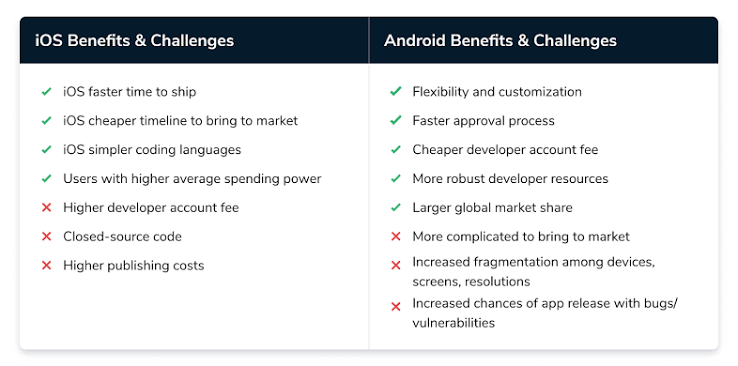
Android if you want more flexibility and a larger global market.
iOS if you prefer a controlled environment and Apple-focused development.
Android vs iOS Job Opportunities
Career opportunities are important when choosing a platform.
Android Developer Jobs
Android developers work on applications used by billions of users worldwide.
Job roles include:
- Android Developer
- Mobile Software Engineer
- Kotlin Developer
- Application Developer
Android skills are valuable in:
- Startups
- Software companies
- Financial technology
- E-commerce
- Enterprise applications
iOS Developer Jobs
iOS developers build applications for Apple’s ecosystem.
Job roles include:
- iOS Developer
- Swift Developer
- Mobile Application Engineer
iOS developers are often needed by companies creating:
- Consumer apps
- Premium mobile services
- Business applications
Android vs iOS Salary Potential
Salary depends on:
- Location
- Experience
- Company
- Technical skills
- Portfolio quality
Both Android and iOS developers can earn competitive salaries.
Experienced developers who understand:
- App architecture
- Cloud services
- APIs
- Performance optimization
often have better opportunities regardless of platform.
Market Reach: Android vs iOS
Android Advantages
Android has a very large global user base.
Benefits:
- More users worldwide
- More device variety
- Strong presence in emerging markets
For developers who want maximum global reach, Android offers strong opportunities.
iOS Advantages
iOS users often spend more on apps and digital services.
Benefits:
- Strong customer engagement
- High-quality ecosystem
- Popular among businesses targeting premium users
Development Tools Comparison
Android Studio
Android developers use Android Studio.
Features include:
- Code editing
- Emulator testing
- Debugging
- Performance analysis
Xcode
iOS developers use Xcode.
Features include:
- App design
- Swift programming
- Testing tools
- Apple device simulation
Learning Cost: Android vs iOS
Android Development
You can start with:
- A Windows, Mac, or Linux computer
- Android Studio
- Android emulator
This makes Android development accessible for many beginners.
iOS Development
iOS development usually requires:
- A Mac computer
- Xcode
- Apple developer tools
The hardware requirement can make starting more expensive.
Android vs iOS App Publishing
Android Publishing
Android apps are published through the Google Play Store.
Advantages:
- Flexible publishing process
- Large audience
- Multiple distribution options
iOS Publishing
iOS apps are published through Apple’s App Store.
Advantages:
- Strong quality standards
- Trusted ecosystem
- Large customer base
Apple has stricter review processes compared with many Android platforms.
Which Platform Is Better for Freelancing?
Both platforms offer freelance opportunities.
Android Freelancing
Opportunities include:
- Business apps
- E-commerce applications
- Utility apps
- Custom solutions
Android’s large user base creates demand in many markets.
iOS Freelancing
Opportunities include:
- Premium applications
- Business tools
- Consumer applications
Many clients choose iOS development because of its strong user spending patterns.
Should Beginners Learn Both Android and iOS?
Learning both can be valuable, but beginners should avoid trying to master everything at once.
A better approach:
- Learn one platform first.
- Build several projects.
- Understand mobile development fundamentals.
- Expand to the second platform later.
Strong fundamentals make learning another platform easier.
Alternative: Cross-Platform Development
Some beginners choose cross-platform development instead.
Popular technologies include:
Flutter
Uses the Dart programming language.
Advantages:
- One codebase
- Android and iOS support
- Fast development
React Native
Uses JavaScript or TypeScript.
Advantages:
- Popular among web developers
- Shared code between platforms
Cross-platform development can be a practical choice for businesses and startups.
Which Platform Should Beginners Choose in 2026?
The best choice depends on your goals.
Choose Android Development If:
✔ You want access to a larger global audience
✔ You prefer flexible development environments
✔ You want to work with many device types
✔ You are interested in Kotlin programming
Choose iOS Development If:
✔ You enjoy Apple’s ecosystem
✔ You want to focus on premium mobile users
✔ You like consistent hardware environments
✔ You want to learn Swift
Choose Cross-Platform Development If:
✔ You want to build apps for both platforms
✔ You prefer faster development
✔ You want to work with startups or businesses
Recommended Beginner Roadmap
Step 1: Learn Programming Basics
Study:
- Variables
- Functions
- Logic
- Object-oriented programming
Step 2: Choose One Platform
Start with:
- Kotlin for Android
or - Swift for iOS
Step 3: Learn App Development Basics
Practice:
- Creating screens
- Navigation
- User input
- Data storage
Step 4: Build Real Projects
Create:
- Notes app
- Calculator app
- Expense tracker
- Weather app
Step 5: Create a Portfolio
Show your skills through:
- Completed apps
- GitHub projects
- App screenshots
- Project explanations
Common Beginner Mistakes
Switching Between Platforms Too Quickly
Focus on mastering one platform first.
Ignoring Programming Basics
Frameworks are easier when you understand coding fundamentals.
Only Following Tutorials
Building your own projects creates stronger skills.
Not Learning Design Principles
A good app needs both functionality and user-friendly design.
Final Verdict: Android or iOS for Beginners?
Both Android and iOS app development are excellent career choices in 2026.
Android is a strong choice for beginners who want:
- A larger global market
- Flexible tools
- More device variety
iOS is a strong choice for beginners who want:
- A controlled ecosystem
- Apple-focused development
- Opportunities in premium markets
There is no single platform that is best for everyone. The most important step is choosing one path, learning consistently, building projects, and developing real-world skills.
A skilled developer with strong fundamentals can succeed on either platform—or eventually work with both.