
In today’s digital world, cybersecurity has become a necessity rather than an option. Whether you’re an individual managing personal accounts or a business handling sensitive customer data, protecting your digital information is more important than ever. Cybercriminals continue to develop sophisticated methods to steal data, disrupt operations, and exploit security weaknesses, making strong cybersecurity practices essential for everyone.
Fortunately, staying safe online doesn’t always require advanced technical knowledge. By following proven cybersecurity best practices, individuals and businesses can significantly reduce the risk of cyberattacks and protect valuable information.
This article explores essential cybersecurity tips that can help safeguard your personal and business data in an increasingly connected world.
Why Cybersecurity Is Important
Cybersecurity is the practice of protecting computers, networks, software, and digital information from unauthorized access, cyberattacks, and data breaches. As more services move online, the amount of sensitive information stored digitally continues to grow.
A successful cyberattack can result in:
- Financial losses
- Identity theft
- Business downtime
- Data breaches
- Loss of customer trust
- Legal and regulatory penalties
- Damage to personal or business reputation
Strong cybersecurity helps prevent these risks while ensuring the safety of valuable digital assets.
Essential Cybersecurity Tips for Individuals
1. Use Strong and Unique Passwords
Passwords are the first line of defense against unauthorized access.
Create passwords that:
- Are at least 12–16 characters long
- Include uppercase and lowercase letters
- Contain numbers and special characters
- Avoid personal information such as birthdays or names
- Are different for every online account
A password manager can securely generate and store complex passwords, making them easier to manage.
2. Enable Multi-Factor Authentication (MFA)
Even strong passwords can be compromised. Multi-factor authentication adds an extra layer of security by requiring an additional verification method, such as:
- A one-time verification code
- An authentication app
- Fingerprint recognition
- Facial recognition
- A physical security key
MFA greatly reduces the chances of unauthorized access to your accounts.
3. Keep Your Devices Updated
Software updates often include security patches that fix newly discovered vulnerabilities.
Regularly update:
- Operating systems
- Mobile apps
- Web browsers
- Antivirus software
- Smart devices
Whenever possible, enable automatic updates to ensure you receive the latest security improvements.
4. Be Aware of Phishing Scams
Phishing attacks are designed to trick users into revealing sensitive information through fake emails, text messages, or websites.
Protect yourself by:
- Verifying the sender before responding
- Avoiding suspicious links
- Checking website URLs carefully
- Never sharing passwords through email or text messages
- Ignoring messages that create unnecessary urgency
5. Secure Your Home Wi-Fi Network
An unsecured Wi-Fi network can provide cybercriminals with easy access to your connected devices.
Improve home network security by:
- Using a strong Wi-Fi password
- Changing default router credentials
- Enabling modern Wi-Fi encryption
- Updating your router’s firmware regularly
- Disabling features you don’t use
6. Back Up Important Data
Unexpected cyberattacks, hardware failures, or accidental deletions can lead to permanent data loss.
Back up important files regularly, including:
- Photos
- Documents
- Videos
- Financial records
- Personal projects
Store backups in both cloud storage and an external hard drive for added protection.
7. Limit the Information You Share Online
Cybercriminals often collect publicly available information to target victims.
Avoid sharing:
- Home address
- Financial details
- Government identification numbers
- Travel plans
- Sensitive personal information
Review your social media privacy settings and only share information with trusted connections.
Essential Cybersecurity Tips for Businesses
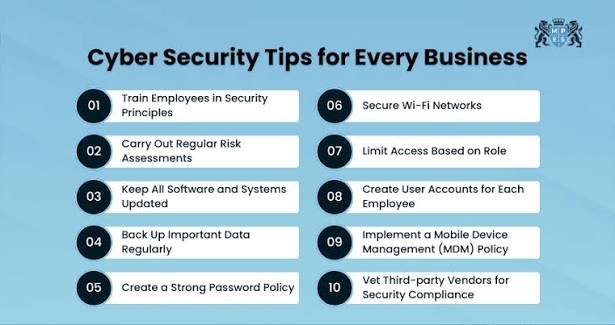
1. Train Employees on Cybersecurity
Human error remains one of the leading causes of cyber incidents. Employees should receive regular cybersecurity awareness training to recognize:
- Phishing emails
- Social engineering attacks
- Suspicious websites
- Unsafe downloads
- Password security best practices
An informed workforce is one of the strongest defenses against cyber threats.
2. Implement Strong Access Controls
Not every employee needs access to every system.
Businesses should:
- Limit access based on job responsibilities
- Use role-based permissions
- Remove inactive accounts promptly
- Monitor user activity regularly
Restricting access reduces the impact of potential security breaches.
3. Protect Business Data
Sensitive company information should always be encrypted during storage and transmission.
Businesses should protect:
- Customer information
- Financial records
- Employee data
- Intellectual property
- Internal communications
Encryption helps keep information secure even if unauthorized access occurs.
4. Keep Business Systems Updated
Outdated software is one of the most common entry points for cybercriminals.
Regularly update:
- Operating systems
- Business applications
- Firewalls
- Security software
- Servers
- Cloud services
Applying security patches promptly helps prevent attackers from exploiting known vulnerabilities.
5. Develop a Data Backup Strategy
Businesses should maintain secure backups of critical information to minimize downtime after cyber incidents.
A reliable backup strategy should include:
- Automated backups
- Off-site storage
- Cloud backups
- Regular recovery testing
Having multiple backup copies improves business continuity.
6. Use Endpoint Protection
Modern businesses rely on laptops, smartphones, tablets, and desktop computers.
Endpoint security solutions help protect these devices from:
- Malware
- Ransomware
- Spyware
- Unauthorized access
- Data theft
Centralized security management also makes monitoring easier.
7. Create an Incident Response Plan
No organization is completely immune to cyber threats. Having a documented response plan helps businesses react quickly during a security incident.
An incident response plan should include:
- Detection procedures
- Reporting processes
- System isolation steps
- Recovery procedures
- Communication strategies
- Post-incident reviews
Preparation can significantly reduce the impact of a cyberattack.
Common Cyber Threats to Watch For
Both individuals and businesses should remain alert to common cyber threats, including:
- Phishing attacks
- Malware infections
- Ransomware
- Identity theft
- Password attacks
- Data breaches
- Social engineering
- AI-powered scams
- Insider threats
- Unsecured public Wi-Fi networks
Understanding these threats makes it easier to recognize suspicious activity and respond appropriately.
Best Practices for Staying Secure Online
Good cybersecurity habits make a significant difference in preventing attacks.
Follow these essential practices:
- Use strong and unique passwords.
- Enable multi-factor authentication.
- Keep all devices updated.
- Install trusted antivirus software.
- Back up important files regularly.
- Avoid clicking suspicious links or attachments.
- Secure your Wi-Fi network.
- Monitor your accounts for unusual activity.
- Educate yourself about emerging cyber threats.
- Review your security settings regularly.
Building a Culture of Cybersecurity
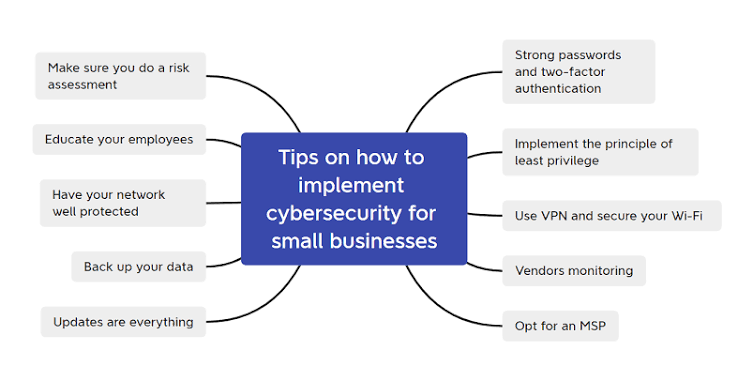
Cybersecurity is not just about installing software—it is about creating habits and awareness. Individuals should make online safety part of their daily routine, while businesses should foster a culture where employees understand the importance of protecting sensitive information.
Regular training, clear security policies, and ongoing communication help reduce risks and encourage responsible digital behavior across an organization.
Conclusion
As cyber threats continue to evolve, strong cybersecurity practices have become essential for both individuals and businesses. From creating strong passwords and enabling multi-factor authentication to training employees and maintaining secure backups, every security measure contributes to a safer digital environment.
Cybersecurity is an ongoing process rather than a one-time task. By staying informed, keeping systems updated, and following proven security best practices, you can protect your personal information, business operations, and digital assets from today’s ever-changing cyber threats.