
The internet has transformed the way we work, communicate, shop, and manage our daily lives. While technology offers countless benefits, it also exposes us to a growing number of cyber threats. Every day, cybercriminals attempt to steal personal information, financial data, and sensitive business records through various online attacks.
The good news is that many cyber threats can be prevented by understanding how they work and following basic cybersecurity practices. Whether you’re an individual, student, or business owner, knowing how to recognize and avoid these threats is essential for staying safe online.
This article explores the most common cyber threats and provides practical tips to help you protect yourself.
What Are Cyber Threats?
Cyber threats are malicious attempts to damage, steal, or gain unauthorized access to digital systems, networks, or personal information. Cybercriminals use different techniques to target individuals and organizations, often exploiting human mistakes or software vulnerabilities.
As technology continues to evolve, cyber threats are becoming more sophisticated, making awareness and prevention more important than ever.
1. Phishing Attacks
Phishing is one of the most common forms of cybercrime. In a phishing attack, scammers send fake emails, text messages, or social media messages that appear to come from trusted organizations.
Their goal is to trick you into revealing sensitive information such as:
- Passwords
- Credit card details
- Banking information
- Personal identification data
How to Protect Yourself
- Verify the sender before responding.
- Avoid clicking suspicious links.
- Check website URLs carefully.
- Never share personal information through unexpected emails or messages.
- Enable multi-factor authentication for important accounts.
2. Malware
Malware is malicious software designed to harm computers, smartphones, or networks. It includes viruses, worms, spyware, trojans, and ransomware.
Malware can:
- Steal personal information.
- Damage files.
- Monitor online activity.
- Slow down your device.
- Give hackers remote access to your system.
How to Protect Yourself
- Install trusted antivirus software.
- Keep your operating system updated.
- Download software only from official sources.
- Avoid opening unknown email attachments.
- Scan external storage devices before use.
3. Ransomware
Ransomware is a type of malware that locks or encrypts your files, making them inaccessible. The attacker then demands payment in exchange for restoring access.
Businesses, hospitals, schools, and individuals have all been targeted by ransomware attacks.
How to Protect Yourself
- Back up important files regularly.
- Keep software updated.
- Avoid suspicious downloads.
- Never open unexpected email attachments.
- Use strong endpoint security solutions.
4. Identity Theft
Identity theft occurs when criminals steal personal information to impersonate someone else. They may use stolen details to open bank accounts, apply for loans, or make fraudulent purchases.
Common targets include:
- National identification numbers
- Credit card information
- Login credentials
- Personal documents
How to Protect Yourself
- Protect sensitive personal information.
- Monitor financial statements regularly.
- Use strong passwords.
- Shred documents containing personal data.
- Report suspicious activity immediately.
5. Password Attacks
Weak or reused passwords make it easier for hackers to gain access to your online accounts.
Cybercriminals often use automated tools to guess passwords or try passwords leaked from previous data breaches.
How to Protect Yourself
- Create unique passwords for every account.
- Use at least 12–16 characters.
- Include letters, numbers, and symbols.
- Use a password manager.
- Enable multi-factor authentication whenever possible.
6. Social Engineering
Social engineering attacks manipulate people into revealing confidential information instead of exploiting technical weaknesses.
Attackers often pretend to be:
- Bank representatives
- Technical support agents
- Company employees
- Government officials
- Friends or family members
How to Protect Yourself
- Verify identities before sharing information.
- Be cautious of urgent requests.
- Never provide passwords over the phone or email.
- Trust official communication channels.
7. Data Breaches
A data breach happens when unauthorized individuals gain access to confidential information stored by an organization.
Leaked information may include:
- Email addresses
- Passwords
- Financial records
- Medical information
- Customer databases
How to Protect Yourself
- Change passwords immediately after breach notifications.
- Avoid password reuse.
- Monitor accounts for suspicious activity.
- Enable login alerts when available.
8. Public Wi-Fi Risks
Free public Wi-Fi networks can expose your data if they are unsecured or controlled by attackers.
Hackers may intercept your internet traffic to steal sensitive information.
How to Protect Yourself
- Avoid online banking on public Wi-Fi.
- Use websites with HTTPS encryption.
- Connect through a trusted Virtual Private Network (VPN).
- Turn off automatic Wi-Fi connections.
9. Fake Websites
Cybercriminals create fake websites that closely resemble legitimate businesses to steal login credentials or payment information.
These websites often look nearly identical to trusted brands.
How to Protect Yourself
- Double-check website addresses.
- Look for HTTPS encryption.
- Avoid clicking links from unsolicited emails.
- Type website addresses manually when possible.
10. AI-Powered Cyber Scams
Artificial intelligence has made online scams more convincing than ever. Criminals can create realistic emails, fake customer support chats, cloned voices, and manipulated videos to deceive victims.
How to Protect Yourself
- Verify unexpected requests through official channels.
- Be skeptical of urgent financial demands.
- Confirm the identity of callers requesting sensitive information.
- Stay informed about new scam techniques.
Best Practices for Staying Safe Online
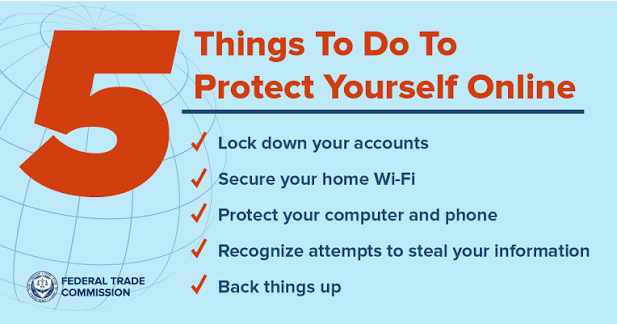
Building good cybersecurity habits is the best way to reduce your risk of becoming a victim of cybercrime.
Follow these simple practices:
- Use strong, unique passwords for every account.
- Enable multi-factor authentication.
- Update your software regularly.
- Back up important files.
- Avoid clicking suspicious links.
- Install trusted security software.
- Secure your home Wi-Fi network.
- Review privacy settings on social media.
- Monitor financial and online accounts regularly.
- Learn to recognize common cyber scams.
Why Cybersecurity Awareness Matters
Technology continues to evolve, and cybercriminals constantly develop new methods to exploit users. Cybersecurity awareness helps individuals recognize threats before they cause damage.
By understanding common attack methods and practicing safe online behavior, you can protect your personal information, financial assets, and digital identity. Even small actions—such as updating software or verifying suspicious messages—can make a significant difference in preventing cyberattacks.
Conclusion
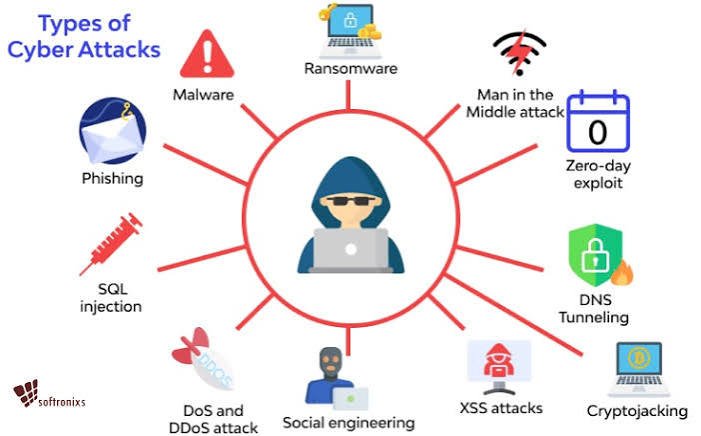
Cyber threats are an unavoidable part of today’s digital world, but they don’t have to put your personal information or finances at risk. Understanding how phishing, malware, ransomware, identity theft, password attacks, and other cyber threats work is the first step toward protecting yourself.
By following basic cybersecurity best practices, including using strong passwords, enabling multi-factor authentication, keeping devices updated, backing up important data, and staying alert to suspicious activity, you can greatly reduce your chances of becoming a victim of cybercrime. Staying informed and adopting secure online habits will help you navigate the digital world with greater confidence and peace of mind.