
Mobile app development has become one of the most exciting career paths in the technology industry. Smartphones have changed the way people communicate, shop, learn, work, and access services. Because of this, companies around the world continue to invest in mobile applications.
From banking and healthcare apps to social media platforms and online shopping applications, mobile developers play an important role in creating digital experiences that millions of people use every day.
For beginners, starting a career in mobile app development can feel challenging. There are many programming languages, tools, frameworks, and learning paths to choose from.
The good news is that anyone with dedication and consistent practice can learn mobile development.
This guide explains the skills you need, the tools developers use, career opportunities, and a step-by-step roadmap to becoming a mobile app developer in 2026.
What Does a Mobile App Developer Do?
A mobile app developer creates applications that run on smartphones and tablets.
Their responsibilities may include:
- Designing app features
- Writing programming code
- Creating user interfaces
- Connecting apps with databases and APIs
- Testing applications
- Fixing bugs
- Improving performance
- Updating apps after release
Mobile developers work with designers, product managers, and other developers to create applications that solve real-world problems.
Why Choose Mobile App Development as a Career in 2026?
Mobile technology continues to grow because smartphones remain a major part of daily life.
Businesses use apps for:
- Customer services
- Online shopping
- Payments
- Communication
- Entertainment
- Education
- Healthcare solutions
The demand for mobile applications creates opportunities for developers in:
- Technology companies
- Startups
- Software agencies
- Freelancing
- Entrepreneurship
Mobile development is also attractive because developers can create their own products and launch independent apps.
Different Career Paths in Mobile App Development
Before learning, beginners should understand the different directions available.
1. Android Developer
Android developers create applications for Android devices.
Common technologies include:
- Kotlin
- Java
- Android Studio
Android development is popular because Android powers a large number of smartphones worldwide.
2. iOS Developer
iOS developers create applications for Apple devices such as iPhones and iPads.
Common technologies include:
- Swift
- SwiftUI
- Xcode
iOS development is known for strong performance and a large user base.
3. Cross-Platform Developer
Cross-platform developers create apps that work on multiple platforms using shared code.
Popular frameworks include:
- Flutter
- React Native
Advantages:
- Faster development
- Reduced costs
- Easier maintenance
Many companies choose cross-platform development for business applications.
4. Mobile App Freelancer
Freelance developers create applications for clients.
Projects may include:
- Business apps
- E-commerce apps
- Booking systems
- Educational apps
Freelancing allows developers to work independently and build experience.
Essential Skills Needed for Mobile App Development
A successful mobile developer needs both technical and professional skills.
1. Programming Fundamentals
Programming knowledge is the foundation of app development.
Beginners should understand:
- Variables
- Data types
- Functions
- Loops
- Conditions
- Object-oriented programming
- Problem-solving logic
These concepts make learning any programming language easier.
2. Learn a Programming Language
Choosing a language depends on your career direction.
For Android Development:
Learn:
- Kotlin
- Java basics
Kotlin is currently one of the main languages used for modern Android development.
For iOS Development:
Learn:
- Swift
Swift is designed for creating applications within Apple’s ecosystem.
For Cross-Platform Development:
Learn:
- Dart for Flutter
- JavaScript/TypeScript for React Native
3. User Interface (UI) and User Experience (UX)
A good app should not only work well but also be easy to use.
Developers should understand:
- Screen layouts
- Navigation
- User interactions
- Responsive design
- Accessibility basics
Good UI and UX improve user satisfaction.
4. Working With APIs
Most modern apps communicate with online services.
Developers need to understand:
- How APIs work
- Sending and receiving data
- Connecting apps to servers
Examples of API usage:
- Payment systems
- Maps
- Weather services
- User authentication
5. Database Knowledge
Many apps store user information.
Examples:
- Accounts
- Messages
- Orders
- Settings
Beginners should learn:
- Database concepts
- Data storage
- Cloud databases
Common technologies include:
- SQLite
- Firebase
- Cloud databases
6. Testing and Debugging
Professional developers spend a lot of time finding and fixing problems.
You need to learn:
- Testing methods
- Error handling
- Debugging tools
- Performance improvements
Debugging is a skill that improves with experience.
7. Version Control
Developers use version control systems to manage code.
The most common tool is Git.
Git helps developers:
- Track changes
- Save versions
- Collaborate with teams
- Manage projects
Important Tools for Mobile App Developers
Learning the right tools is an important part of becoming a developer.
Android Studio
Android Studio is the official development environment for Android apps.
It provides:
- Code editing
- Testing tools
- Device simulation
- Debugging features
Xcode
Xcode is Apple’s development environment for iOS apps.
It allows developers to:
- Write Swift code
- Design interfaces
- Test applications
Visual Studio Code
A popular editor used for:
- Flutter development
- React Native projects
- General programming
Git and GitHub
These tools help developers manage and showcase their projects.
A GitHub portfolio can help demonstrate your skills to employers.
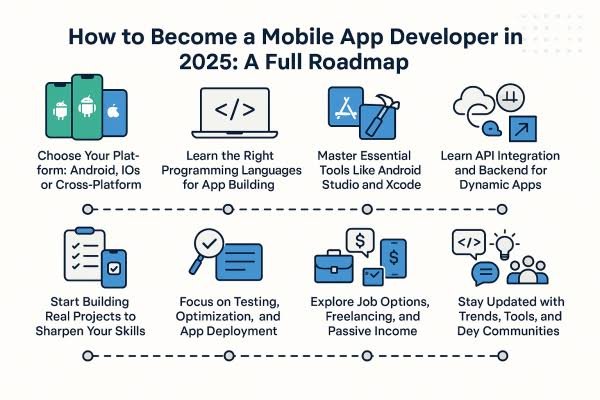
Mobile App Development Roadmap for Beginners
A structured roadmap makes learning easier.
Stage 1: Learn Programming Basics (Month 1–2)
Start with:
- Programming logic
- Variables
- Functions
- Conditions
- Loops
- Basic algorithms
Focus on understanding concepts rather than memorizing code.
Stage 2: Choose Your Development Path (Month 2–3)
Decide whether you want to focus on:
- Android
- iOS
- Cross-platform development
Choosing one path prevents confusion.
Stage 3: Learn Frameworks and Tools (Month 3–6)
Practice with:
For Android:
- Kotlin
- Android Studio
For iOS:
- Swift
- Xcode
For Cross-platform:
- Flutter
- React Native
Stage 4: Build Beginner Projects (Month 4–8)
Create simple applications such as:
- Calculator app
- To-do list app
- Notes app
- Weather app
- Expense tracker
Projects help you understand real development processes.
Stage 5: Learn Advanced Features (Month 6–12)
Improve your skills by learning:
- User authentication
- APIs
- Databases
- Notifications
- App security
- Cloud services
Stage 6: Create a Portfolio
A strong portfolio can improve job opportunities.
Include:
- Completed apps
- Source code
- Project descriptions
- Screenshots
- Technical explanations
Employers often value practical work.
Career Opportunities in Mobile App Development
Mobile development skills can lead to several jobs.
Mobile App Developer
Responsibilities:
- Build applications
- Add features
- Fix problems
- Maintain apps
Android Developer
Works on:
- Android applications
- Mobile interfaces
- Android services
iOS Developer
Works on:
- Apple applications
- Swift development
- iOS features
Flutter Developer
Creates cross-platform apps using Flutter.
React Native Developer
Builds mobile applications using JavaScript-based frameworks.
Mobile Software Engineer
Works on larger application systems and development teams.
Freelance Mobile Developer
Builds apps for clients and businesses.
How Long Does It Take to Become a Mobile Developer?
The timeline depends on your learning speed and practice.
A realistic beginner path:
3–6 Months
You can learn:
- Programming basics
- Simple app development
- Basic projects
6–12 Months
You can build:
- More advanced applications
- Portfolio projects
- Real-world apps
1–2 Years
With consistent practice, you can become ready for professional roles.
Common Mistakes Beginners Should Avoid
Learning Too Many Technologies at Once
Focus on one development path first.
Only Watching Tutorials
Building projects is more important than only studying theory.
Ignoring Programming Fundamentals
Strong basics make advanced development easier.
Not Creating Projects
Employers want evidence of your skills.
How to Improve Your Chances of Getting a Job
Build Real Projects
Create apps that solve real problems.
Share Your Work
Use:
- GitHub
- Personal portfolio websites
- Professional profiles
Practice Problem-Solving
Technical interviews often test logical thinking.
Learn From Real Applications
Analyze existing apps and understand:
- Design choices
- Features
- User experience
Is Mobile App Development a Good Career Choice in 2026?
Mobile app development remains a valuable career option in 2026 because businesses continue to depend on mobile technology.
It is a good choice for people who enjoy:
- Coding
- Creativity
- Building products
- Solving problems
However, success requires continuous learning because technology changes quickly.
Developers need to keep improving their skills and learning new tools.
Final Thoughts
Starting a career in mobile app development requires learning programming fundamentals, choosing a development path, practicing with projects, and building real-world experience.
The journey may seem challenging at first, but a structured approach makes it manageable. By learning technologies like Kotlin, Swift, Flutter, or React Native and creating a strong portfolio, beginners can build the skills needed for professional mobile development careers.
In 2026, mobile apps remain a major part of the digital world, making app development a promising field for anyone interested in technology and software creation.